利用RouterOs 的L2TP协议实现多方异地组网实现互通,并实现在家办公。
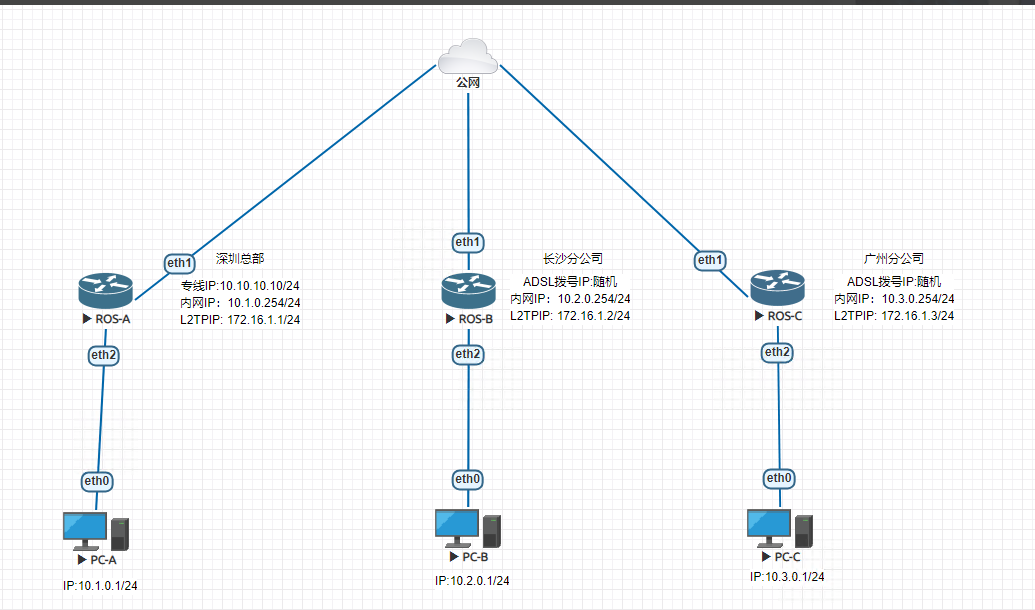
当前环境EVE-ng模拟真实环境搭建 ROS-A为深圳总部--专线固定IPROS-B为长沙分公司--ADSL拨号上网ROS-C为广州分公司--ADSL拨号上网实现功能长沙和广州分公司和深圳总部公司内网互通 一、网络规划 1、各区域独自上网[break] 2、各区域通过IP地址互通(L2TP) 以下为网络拓扑图
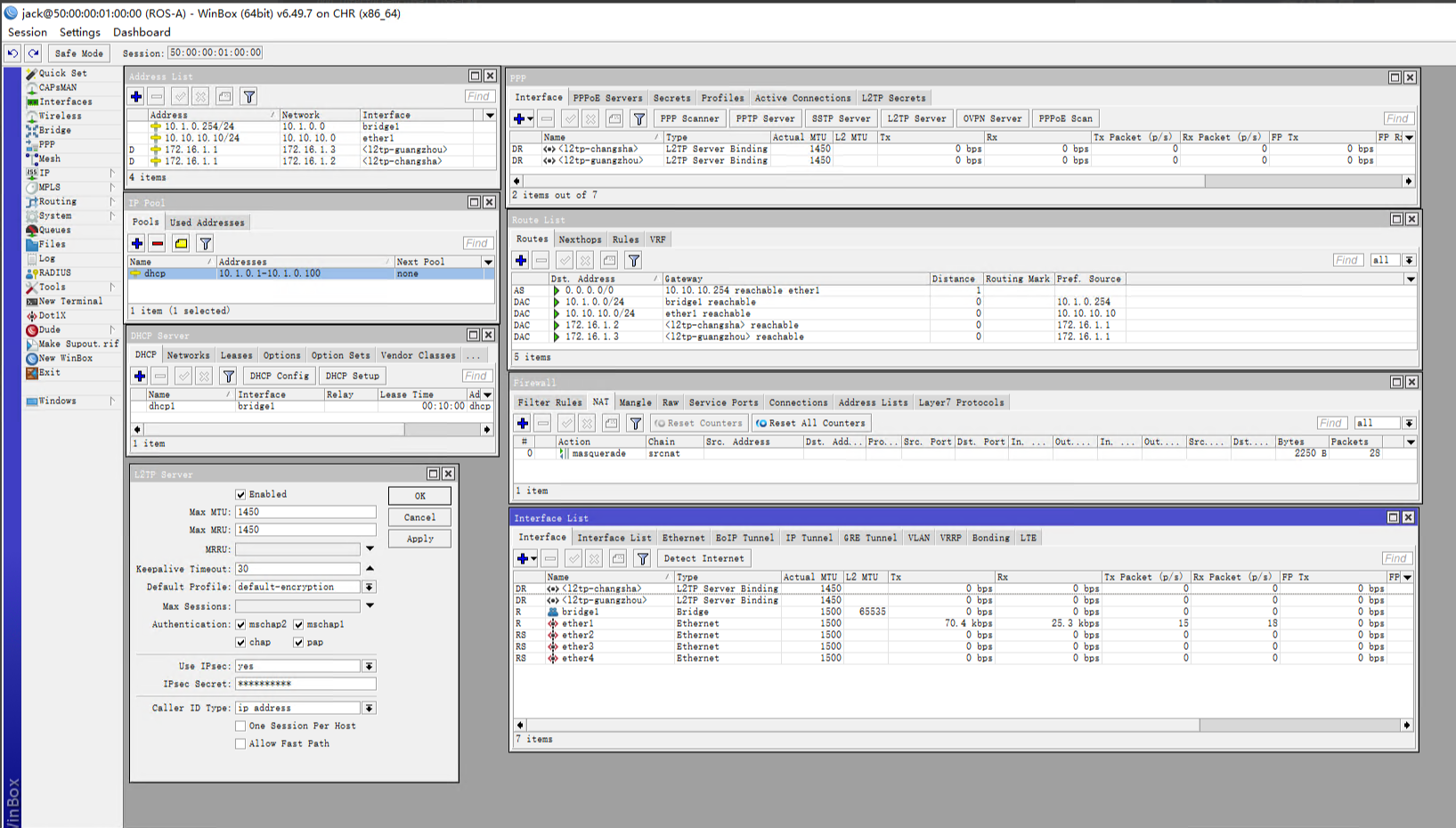
二、ROS配置命令与截图 1、ROS-A配置
- /interface bridge
- add name=bridge1
- /ip pool
- add name=dhcp ranges=10.1.0.1-10.1.0.100
- /ip dhcp-server
- add address-pool=dhcp disabled=no interface=bridge1 name=dhcp1
- /interface bridge port
- add bridge=bridge1 interface=ether2
- add bridge=bridge1 interface=ether3
- add bridge=bridge1 interface=ether4
- /interface l2tp-server server
- set enabled=yes ipsec-secret=masktt.com use-ipsec=yes
- /interface list member
- add interface=ether1 list=WAN
- add interface=bridge1 list=LAN
- /ip address
- add address=10.1.0.254/24 interface=bridge1 network=10.1.0.0
- add address=10.10.10.10/24 interface=ether1 network=10.10.10.0
- /ip dhcp-client
- add interface=ether1
- /ip dhcp-server network
- add address=10.1.0.0/24 dns-server=114.114.114.114 gateway=10.1.0.254 \
- netmask=24
- /ip dns
- set servers=114.114.114.114
- /ip firewall nat
- add action=masquerade chain=srcnat
- /ip route
- add distance=1 gateway=10.10.10.254
- /ppp secret
- add local-address=172.16.1.1 name=changsha password=changsha remote-address=\
- 172.16.1.2 service=l2tp
- add local-address=172.16.1.1 name=guangzhou password=changsha remote-address=\
- 172.16.1.3 service=l2tp
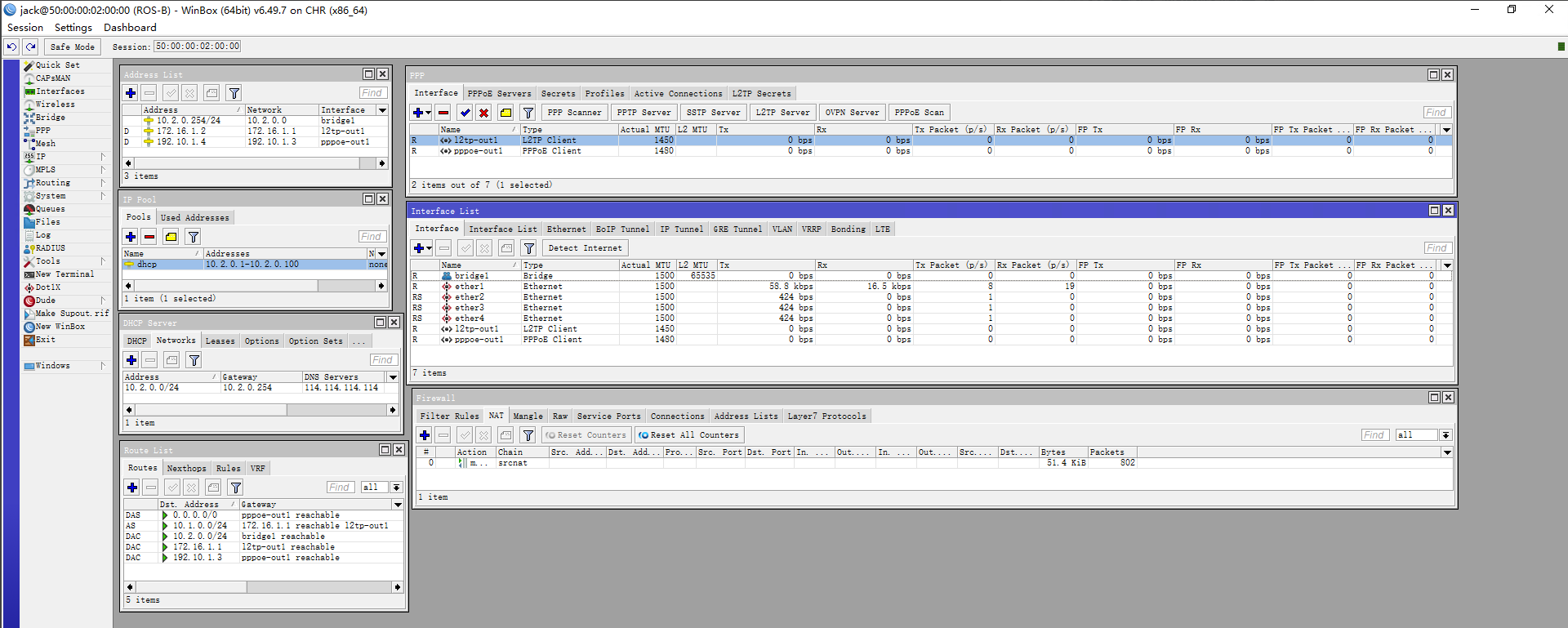
2、ROS-B配置
- /interface bridge
- add name=bridge1
- /interface pppoe-client
- add add-default-route=yes disabled=no interface=ether1 name=pppoe-out1 \
- password=changsha use-peer-dns=yes user=ROS-B
- /interface l2tp-client
- add connect-to=10.10.10.10 disabled=no ipsec-secret=masktt.com name=l2tp-out1 \
- password=changsha use-ipsec=yes user=changsha
- /ip pool
- add name=dhcp ranges=10.2.0.1-10.2.0.100
- /ip dhcp-server
- add address-pool=dhcp disabled=no interface=bridge1 name=dhcp1
- /interface bridge port
- add bridge=bridge1 interface=ether2
- add bridge=bridge1 interface=ether3
- add bridge=bridge1 interface=ether4
- /interface list member
- add interface=pppoe-out1 list=WAN
- add interface=bridge1 list=LAN
- /ip address
- add address=10.2.0.254/24 interface=bridge1 network=10.2.0.0
- /ip dhcp-client
- add interface=ether1
- /ip dhcp-server network
- add address=10.2.0.0/24 dns-server=114.114.114.114 gateway=10.2.0.254 \
- netmask=24
- /ip firewall nat
- add action=masquerade chain=srcnat
- /ip route
- add distance=1 dst-address=10.1.0.0/24 gateway=172.16.1.1
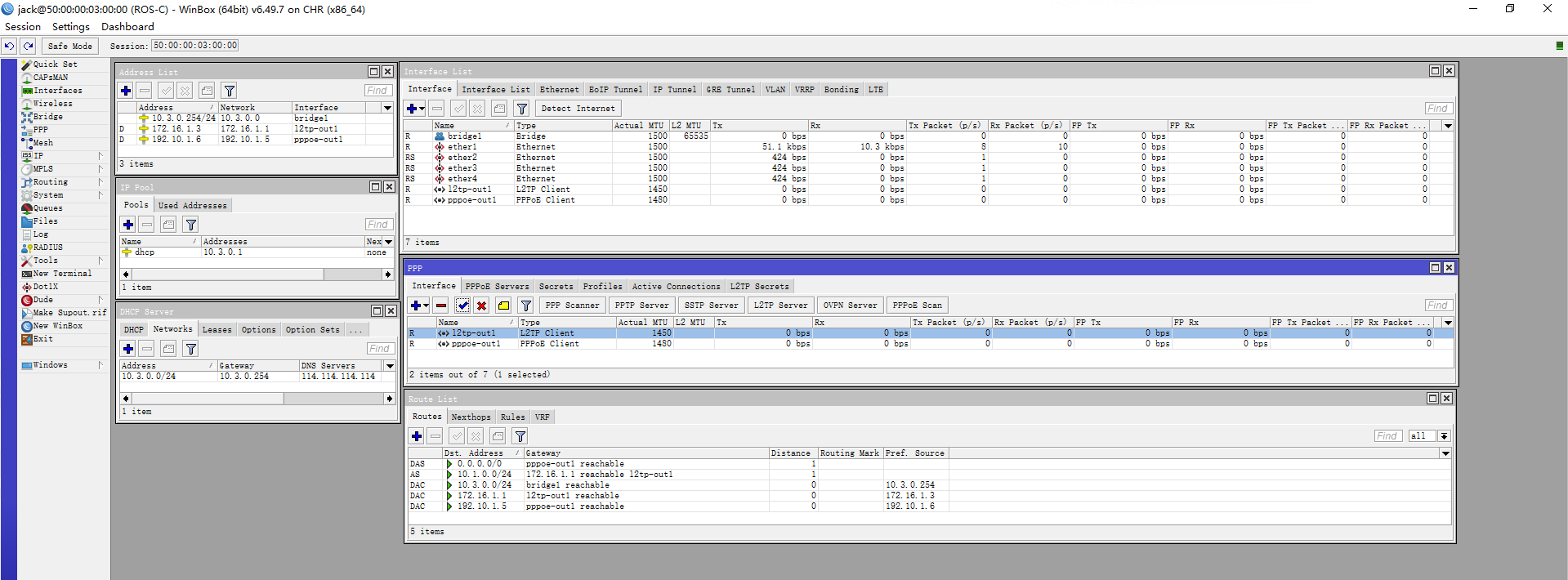
3、ROS-C配置
- /interface bridge
- add name=bridge1
- /interface pppoe-client
- add add-default-route=yes disabled=no interface=ether1 name=pppoe-out1 \
- password=guangzhou use-peer-dns=yes user=ROS-C
- /interface l2tp-client
- add connect-to=10.10.10.10 disabled=no ipsec-secret=masktt.com name=l2tp-out1 \
- password=guangzhou use-ipsec=yes user=guangzhou
- /ip pool
- add name=dhcp ranges=10.3.0.1-10.3.0.100
- /ip dhcp-server
- add address-pool=dhcp disabled=no interface=bridge1 name=dhcp1
- /interface bridge port
- add bridge=bridge1 interface=ether2
- add bridge=bridge1 interface=ether3
- add bridge=bridge1 interface=ether4
- /interface list member
- add interface=pppoe-out1 list=WAN
- add interface=bridge1 list=LAN
- /ip address
- add address=10.3.0.254/24 interface=bridge1 network=10.3.0.0
- /ip dhcp-client
- add interface=ether1
- /ip dhcp-server network
- add address=10.3.0.0/24 dns-server=114.114.114.114 gateway=10.3.0.254 \
- netmask=24
- /ip firewall nat
- add action=masquerade chain=srcnat
- /ip route
- add distance=1 dst-address=10.1.0.0/24 gateway=172.16.1.1
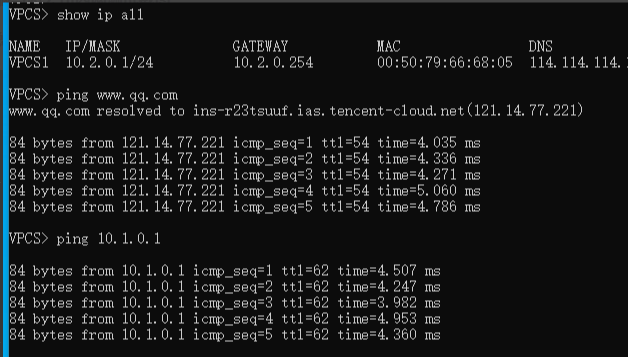
4、长沙和广州分公司电脑与总公司内网测试截图 ROS-B长沙公司与深圳总部ping测试截图
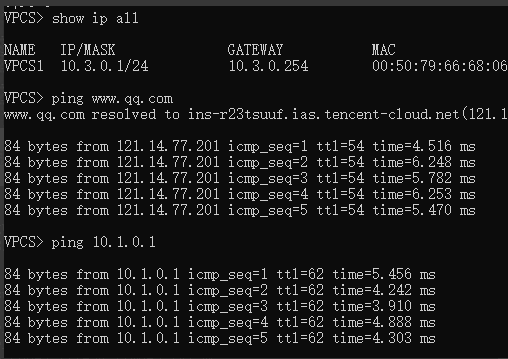
ROS-C广州公司与深圳总部ping测试截图
以后是实操命令和winbox截图,电脑测试ping截图。
|
 关注公众号
关注公众号

 窥视卡
窥视卡 雷达卡
雷达卡


 发表于 2026-8-20 21:16:38
 提升卡
提升卡 置顶卡
置顶卡 沉默卡
沉默卡 喧嚣卡
喧嚣卡 变色卡
变色卡 千斤顶
千斤顶 照妖镜
照妖镜