|
1.配置参数 获取 脚本并在文件开头配置其参数。 此步骤很简单,因为所有参数都有很好的注释。 重要!不要忘记提供正确的电子邮件地址以进行备份并注意scriptMode变量。
2. 创建新脚本 系统 -> 脚本 [添加]
重要!脚本名称必须是将BackupAndUpdate 您先前配置的脚本插入到源区域。
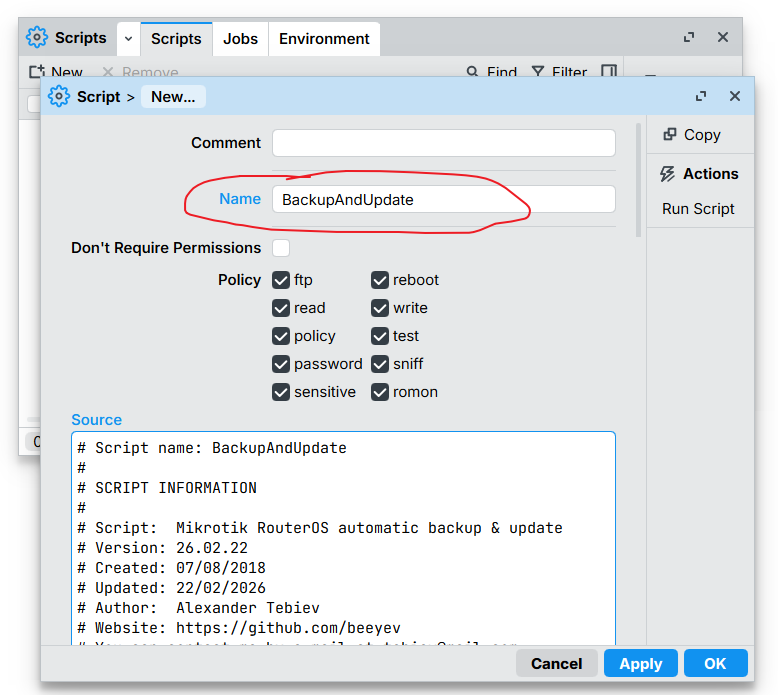
- # Script name: BackupAndUpdate
- #
- #----------SCRIPT INFORMATION---------------------------------------------------
- #
- # Script: Mikrotik RouterOS automatic backup & update
- # Version: 24.06.04
- # Created: 07/08/2018
- # Updated: 04/06/2024
- # You can contact me by e-mail at tebiev@mail.com
- #
- # IMPORTANT!
- # Minimum supported RouterOS version is v6.43.7
- #
- #----------MODIFY THIS SECTION AS NEEDED----------------------------------------
- ## Notification e-mail
- ## (Make sure you have configurated Email settings in Tools -> Email)
- :local emailAddress "这里修改成你的邮箱地址xxxxx@qq.com";
- ## Script mode, possible values: backup, osupdate, osnotify.
- # backup - Only backup will be performed. (default value, if none provided)
- #
- # osupdate - The script will install a new RouterOS version if it is available.
- # It will also create backups before and after update process (it does not matter what value `forceBackup` is set to)
- # Email will be sent only if a new RouterOS version is available.
- # Change parameter `forceBackup` if you need the script to create backups every time when it runs (even when no updates were found).
- #
- # osnotify - The script will send email notifications only (without backups) if a new RouterOS update is available.
- # Change parameter `forceBackup` if you need the script to create backups every time when it runs.
- :local scriptMode "osupdate";
- ## Additional parameter if you set `scriptMode` to `osupdate` or `osnotify`
- # Set `true` if you want the script to perform backup every time it's fired, whatever script mode is set.
- :local forceBackup false;
- ## Backup encryption password, no encryption if no password.
- :local backupPassword ""
- ## If true, passwords will be included in exported config.
- :local sensitiveDataInConfig true;
- ## Update channel. Possible values: stable, long-term, testing, development
- :local updateChannel "stable";
- ## Installs only patch versions of RouterOS updates.
- ## Works only if you set scriptMode to "osupdate"
- ## Means that new update will be installed only if MAJOR and MINOR version numbers remained the same as currently installed RouterOS.
- ## Example: v6.43.6 => major.minor.PATCH
- ## Script will send information if new version is greater than just patch.
- :local installOnlyPatchUpdates false;
- ## If true, device public IP address information will be included into the email message
- :local detectPublicIpAddress true;
- ## Allow anonymous statistics collection. (script mode, device model, OS version)
- :local allowAnonymousStatisticsCollection true;
- ##------------------------------------------------------------------------------------------##
- # !!!! DO NOT CHANGE ANYTHING BELOW THIS LINE, IF YOU ARE NOT SURE WHAT YOU ARE DOING !!!! #
- ##------------------------------------------------------------------------------------------##
- #Script messages prefix
- :local SMP "Bkp&Upd:"
- :log info "\r\n$SMP script "Mikrotik RouterOS automatic backup & update" started.";
- :log info "$SMP Script Mode: $scriptMode, forceBackup: $forceBackup";
- # Check email settings
- :if ([:len $emailAddress] = 0) do={
- :log error ("$SMP \$emailAddress variable is empty. Script stopped.");
- :error "$SMP bye!";
- }
- :local emailServer ""
- :do {
- :set emailServer [/tool e-mail get server];
- } on-error={
- # Old of getting email server before the RouterOS v7.12
- :log info "$SMP Checking email server using old command `/tool e-mail get address`";
- :set emailServer [/tool e-mail get address];
- }
- :if ($emailServer = "0.0.0.0") do={
- :log error ("$SMP Email server address is not correct, please check Tools -> Email. Script stopped.");
- :error "$SMP bye!";
- }
- :if ([:len [/tool e-mail get from]] = 0 or [/tool e-mail get from] = "<>") do={
- :log error ("$SMP Email configuration FROM address is not correct, please check Tools -> Email. Script stopped.");
- :error "$SMP bye!";
- }
- #Check if proper identity name is set
- if ([:len [/system identity get name]] = 0 or [/system identity get name] = "MikroTik") do={
- :log warning ("$SMP Please set identity name of your device (System -> Identity), keep it short and informative.");
- };
- ############### vvvvvvvvv GLOBALS vvvvvvvvv ###############
- # Function converts standard mikrotik build versions to the number.
- # Possible arguments: paramOsVer
- # Example:
- # :put [$buGlobalFuncGetOsVerNum paramOsVer=[/system routerboard get current-RouterOS]];
- # Result will be: 64301, because current RouterOS version is: 6.43.1
- :global buGlobalFuncGetOsVerNum do={
- :local osVer $paramOsVer;
- :local osVerNum;
- :local osVerMicroPart;
- :local zro 0;
- :local tmp;
- # Replace word `beta` with dot
- :local isBetaPos [:tonum [:find $osVer "beta" 0]];
- :if ($isBetaPos > 1) do={
- :set osVer ([:pick $osVer 0 $isBetaPos] . "." . [:pick $osVer ($isBetaPos + 4) [:len $osVer]]);
- }
- # Replace word `rc` with dot
- :local isRcPos [:tonum [:find $osVer "rc" 0]];
- :if ($isRcPos > 1) do={
- :set osVer ([:pick $osVer 0 $isRcPos] . "." . [:pick $osVer ($isRcPos + 2) [:len $osVer]]);
- }
- :local dotPos1 [:find $osVer "." 0];
- :if ($dotPos1 > 0) do={
- # AA
- :set osVerNum [:pick $osVer 0 $dotPos1];
- :local dotPos2 [:find $osVer "." $dotPos1];
- #Taking minor version, everything after first dot
- :if ([:len $dotPos2] = 0) do={:set tmp [:pick $osVer ($dotPos1+1) [:len $osVer]];}
- #Taking minor version, everything between first and second dots
- :if ($dotPos2 > 0) do={:set tmp [:pick $osVer ($dotPos1+1) $dotPos2];}
- # AA 0B
- :if ([:len $tmp] = 1) do={:set osVerNum "$osVerNum$zro$tmp";}
- # AA BB
- :if ([:len $tmp] = 2) do={:set osVerNum "$osVerNum$tmp";}
- :if ($dotPos2 > 0) do={
- :set tmp [:pick $osVer ($dotPos2+1) [:len $osVer]];
- # AA BB 0C
- :if ([:len $tmp] = 1) do={:set osVerNum "$osVerNum$zro$tmp";}
- # AA BB CC
- :if ([:len $tmp] = 2) do={:set osVerNum "$osVerNum$tmp";}
- } else={
- # AA BB 00
- :set osVerNum "$osVerNum$zro$zro";
- }
- } else={
- # AA 00 00
- :set osVerNum "$osVer$zro$zro$zro$zro";
- }
- :return $osVerNum;
- }
- # Function creates backups (system and config) and returns array with names
- # Possible arguments:
- # `backupName` | string | backup file name, without extension!
- # `backupPassword` | string |
- # `sensitiveDataInConfig` | boolean |
- # Example:
- # :put [$buGlobalFuncCreateBackups name="daily-backup"];
- :global buGlobalFuncCreateBackups do={
- :log info ("$SMP Global function "buGlobalFuncCreateBackups" was fired.");
- :local backupFileSys "$backupName.backup";
- :local backupFileConfig "$backupName.rsc";
- :local backupNames {$backupFileSys;$backupFileConfig};
- ## Make system backup
- :if ([:len $backupPassword] = 0) do={
- /system backup save dont-encrypt=yes name=$backupName;
- } else={
- /system backup save password=$backupPassword name=$backupName;
- }
- :log info ("$SMP System backup created. $backupFileSys");
- ## Export config file
- :if ($sensitiveDataInConfig = true) do={
- # Since RouterOS v7 it needs to be explicitly set that we want to export sensitive data
- :if ([:pick [/system package update get installed-version] 0 1] < 7) do={
- :execute "/export compact terse file=$backupName";
- } else={
- :execute "/export compact show-sensitive terse file=$backupName";
- }
- } else={
- /export compact hide-sensitive terse file=$backupName;
- }
- :log info ("$SMP Config file was exported. $backupFileConfig, the script execution will be paused for a moment.");
- #Delay after creating backups
- :delay 20s;
- :return $backupNames;
- }
- :global buGlobalVarUpdateStep;
- ############### ^^^^^^^^^ GLOBALS ^^^^^^^^^ ###############
- :local scriptVersion "23.11.25";
- # Current time `hh-mm-ss`
- :local currentTime ([:pick [/system clock get time] 0 2] . "-" . [:pick [/system clock get time] 3 5] . "-" . [:pick [/system clock get time] 6 8]);
- :local currentDateTime ("-" . $currentTime);
- # Detect old date format, Example: `nov/11/2023`
- :if ([:len [:tonum [:pick [/system clock get date] 0 1]]] = 0) do={
- :set currentDateTime ([:pick [/system clock get date] 7 11] . [:pick [/system clock get date] 0 3] . [:pick [/system clock get date] 4 6] . "-" . $currentTime);
- } else={
- # New date format, Example: `2023-11-11`
- :set currentDateTime ([/system clock get date] . "-" . $currentTime);
- };
- :local isSoftBased false;
- :if ([:pick [/system resource get board-name] 0 3] = "CHR" or [:pick [/system resource get board-name] 0 3] = "x86") do={
- :set isSoftBased true;
- };
- :local deviceOsVerInst [/system package update get installed-version];
- :local deviceOsVerInstNum [$buGlobalFuncGetOsVerNum paramOsVer=$deviceOsVerInst];
- :local deviceOsVerAvail "";
- :local deviceOsVerAvailNum 0;
- :local deviceIdentityName [/system identity get name];
- :local deviceIdentityNameShort [:pick $deviceIdentityName 0 18]
- :local deviceUpdateChannel [/system package update get channel];
- :local deviceRbModel "CloudHostedRouter";
- :local deviceRbSerialNumber "--";
- :local deviceRbCurrentFw "--";
- :local deviceRbUpgradeFw "--";
- :if ($isSoftBased = false) do={
- :set deviceRbModel [/system routerboard get model];
- :set deviceRbSerialNumber [/system routerboard get serial-number];
- :set deviceRbCurrentFw [/system routerboard get current-firmware];
- :set deviceRbUpgradeFw [/system routerboard get upgrade-firmware];
- };
- :local isOsUpdateAvailable false;
- :local isOsNeedsToBeUpdated false;
- :local isSendEmailRequired true;
- :local mailSubject "$SMP Device - $deviceIdentityNameShort.";
- :local mailBody "";
- :local mailBodyDeviceInfo "\r\n\r\nDevice information: \r\nIdentity: $deviceIdentityName \r\nModel: $deviceRbModel \r\nSerial number: $deviceRbSerialNumber \r\nCurrent RouterOS: $deviceOsVerInst ($[/system package update get channel]) $[/system resource get build-time] \r\nCurrent routerboard FW: $deviceRbCurrentFw \r\nDevice uptime: $[/system resource get uptime]";
- :local mailBodyCopyright "\r\n\r\nMikrotik RouterOS automatic backup & update (ver. $scriptVersion) \r\nhttps://github.com/beeyev/Mikrotik-RouterOS-automatic-backup-and-update";
- :local changelogUrl ("Check RouterOS changelog: https://mikrotik.com/download/changelogs/" . $updateChannel . "-release-tree");
- :local backupName "v$deviceOsVerInst_$deviceUpdateChannel_$currentDateTime";
- :local backupNameBeforeUpd "backup_before_update_$backupName";
- :local backupNameAfterUpd "backup_after_update_$backupName";
- :local backupNameFinal $backupName;
- :local mailAttachments [:toarray ""];
- :local ipAddressDetectServiceDefault "https://ipv4.mikrotik.ovh/"
- :local ipAddressDetectServiceFallback "https://api.ipify.org/"
- :local publicIpAddress "not detected";
- :local telemetryDataQuery "";
- :local updateStep $buGlobalVarUpdateStep;
- :do {/system script environment remove buGlobalVarUpdateStep;} on-error={}
- :if ([:len $updateStep] = 0) do={
- :set updateStep 1;
- }
- ## IP address detection & anonymous statistics collection
- :if ($updateStep = 1 or $updateStep = 3) do={
- :if ($updateStep = 3) do={
- :log info ("$SMP Waiting for one minute before continuing to the final step.");
- :delay 1m;
- }
- :if ($detectPublicIpAddress = true or $allowAnonymousStatisticsCollection = true) do={
- :if ($allowAnonymousStatisticsCollection = true) do={
- :set telemetryDataQuery ("\?mode=" . $scriptMode . "&osver=" . $deviceOsVerInst . "&model=" . $deviceRbModel);
- }
- :do {:set publicIpAddress ([/tool fetch http-method="get" url=($ipAddressDetectServiceDefault . $telemetryDataQuery) output=user as-value]->"data");} on-error={
- :if ($detectPublicIpAddress = true) do={
- :log warning "$SMP Could not detect public IP address using default detection service."
- :log warning "$SMP Trying to detect public ip using fallback detection service."
- :do {:set publicIpAddress ([/tool fetch http-method="get" url=$ipAddressDetectServiceFallback output=user as-value]->"data");} on-error={
- :log warning "$SMP Could not detect public IP address using fallback detection service."
- }
- }
- }
- :if ($detectPublicIpAddress = true) do={
- # Always truncate the string for safety measures
- :set publicIpAddress ([:pick $publicIpAddress 0 15])
- :set mailBodyDeviceInfo ($mailBodyDeviceInfo . "\r\nPublic IP address: " . $publicIpAddress);
- }
- }
- }
- ## STEP ONE: Creating backups, checking for new RouterOs version and sending email with backups,
- ## Steps 2 and 3 are fired only if script is set to automatically update device and if a new RouterOs version is available.
- :if ($updateStep = 1) do={
- :log info ("$SMP Performing the first step.");
- # Checking for new RouterOS version
- if ($scriptMode = "osupdate" or $scriptMode = "osnotify") do={
- log info ("$SMP Checking for new RouterOS version. Current version is: $deviceOsVerInst");
- /system package update set channel=$updateChannel;
- /system package update check-for-updates;
- :delay 5s;
- :set deviceOsVerAvail [/system package update get latest-version];
- # If there is a problem getting information about available RouterOS versions from server
- :if ([:len $deviceOsVerAvail] = 0) do={
- :log warning ("$SMP There is a problem getting information about new RouterOS from server.");
- :set mailSubject ($mailSubject . " Error: No data about new RouterOS!")
- :set mailBody ($mailBody . "Error occured! \r\nMikrotik couldn't get any information about new RouterOS from server! \r\nWatch additional information in device logs.")
- } else={
- #Get numeric version of OS
- :set deviceOsVerAvailNum [$buGlobalFuncGetOsVerNum paramOsVer=$deviceOsVerAvail];
- # Checking if OS on server is greater than installed one.
- :if ($deviceOsVerAvailNum > $deviceOsVerInstNum) do={
- :set isOsUpdateAvailable true;
- :log info ("$SMP New RouterOS is available! $deviceOsVerAvail");
- } else={
- :set isSendEmailRequired false;
- :log info ("$SMP System is already up to date.");
- :set mailSubject ($mailSubject . " No new OS updates.");
- :set mailBody ($mailBody . "Your system is up to date.");
- }
- };
- } else={
- :set scriptMode "backup";
- };
- if ($forceBackup = true) do={
- # In this case the script will always send an email, because it has to create backups
- :set isSendEmailRequired true;
- }
- # If a new OS version is available to install
- if ($isOsUpdateAvailable = true and $isSendEmailRequired = true) do={
- # If we only need to notify about a new available version
- if ($scriptMode = "osnotify") do={
- :set mailSubject ($mailSubject . " New RouterOS is available! v.$deviceOsVerAvail.")
- :set mailBody ($mailBody . "New RouterOS version is available to install: v.$deviceOsVerAvail ($updateChannel) \r\n$changelogUrl")
- }
- # If we need to initiate RouterOS update process
- if ($scriptMode = "osupdate") do={
- :set isOsNeedsToBeUpdated true;
- # If we need to install only patch updates
- :if ($installOnlyPatchUpdates = true) do={
- #Check if Major and Minor builds are the same.
- :if ([:pick $deviceOsVerInstNum 0 ([:len $deviceOsVerInstNum]-2)] = [:pick $deviceOsVerAvailNum 0 ([:len $deviceOsVerAvailNum]-2)]) do={
- :log info ("$SMP New patch version of RouterOS firmware is available.");
- } else={
- :log info ("$SMP New major or minor version of RouterOS firmware is available. You need to update it manually.");
- :set mailSubject ($mailSubject . " New RouterOS: v.$deviceOsVerAvail needs to be installed manually.");
- :set mailBody ($mailBody . "New major or minor RouterOS version is available to install: v.$deviceOsVerAvail ($updateChannel). \r\nYou chose to automatically install only patch updates, so this major update you need to install manually. \r\n$changelogUrl");
- :set isOsNeedsToBeUpdated false;
- }
- }
- #Check again, because this variable could be changed during checking for installing only patch updats
- if ($isOsNeedsToBeUpdated = true) do={
- :log info ("$SMP New RouterOS is going to be installed! v.$deviceOsVerInst -> v.$deviceOsVerAvail");
- :set mailSubject ($mailSubject . " New RouterOS is going to be installed! v.$deviceOsVerInst -> v.$deviceOsVerAvail.");
- :set mailBody ($mailBody . "Your Mikrotik will be updated to the new RouterOS version from v.$deviceOsVerInst to v.$deviceOsVerAvail (Update channel: $updateChannel) \r\nA final report with detailed information will be sent once the update process is completed. \r\nIf you do not receive a second email within the next 10 minutes, there may be an issue. Please check your device logs for further information.");
- #!! There is more code connected to this part and first step at the end of the script.
- }
- }
- }
- ## Checking If the script needs to create a backup
- :log info ("$SMP Checking If the script needs to create a backup.");
- if ($forceBackup = true or $scriptMode = "backup" or $isOsNeedsToBeUpdated = true) do={
- :log info ("$SMP Creating system backups.");
- if ($isOsNeedsToBeUpdated = true) do={
- :set backupNameFinal $backupNameBeforeUpd;
- };
- if ($scriptMode != "backup") do={
- :set mailBody ($mailBody . "\r\n\r\n");
- };
- :set mailSubject ($mailSubject . " Backup was created.");
- :set mailBody ($mailBody . "System backups were created and attached to this email.");
- :set mailAttachments [$buGlobalFuncCreateBackups backupName=$backupNameFinal backupPassword=$backupPassword sensitiveDataInConfig=$sensitiveDataInConfig];
- } else={
- :log info ("$SMP Creating a backup is not necessary.");
- }
- # Combine first step email
- :set mailBody ($mailBody . $mailBodyDeviceInfo . $mailBodyCopyright);
- }
- ## STEP TWO: (after first reboot) routerboard firmware upgrade
- ## Steps 2 and 3 are fired only if script is set to automatically update device and if new RouterOs is available.
- :if ($updateStep = 2) do={
- :log info ("$SMP Performing the second step.");
- ## RouterOS is the latest, let's check for upgraded routerboard firmware
- if ($deviceRbCurrentFw != $deviceRbUpgradeFw) do={
- :set isSendEmailRequired false;
- :delay 10s;
- :log info "$SMP Upgrading routerboard firmware from v.$deviceRbCurrentFw to v.$deviceRbUpgradeFw";
- ## Start the upgrading process
- /system routerboard upgrade;
- ## Wait until the upgrade is completed
- :delay 5s;
- :log info "$SMP routerboard upgrade process was completed, going to reboot in a moment!";
- ## Set scheduled task to send final report on the next boot, task will be deleted when it is done. (That is why you should keep original script name)
- /system scheduler add name=BKPUPD-FINAL-REPORT-ON-NEXT-BOOT on-event=":delay 5s; /system scheduler remove BKPUPD-FINAL-REPORT-ON-NEXT-BOOT; :global buGlobalVarUpdateStep 3; :delay 10s; /system script run BackupAndUpdate;" start-time=startup interval=0;
- ## Reboot system to boot with new firmware
- /system reboot;
- } else={
- :log info "$SMP It appears that your routerboard is already up to date, skipping this step.";
- :set updateStep 3;
- };
- }
- ## STEP THREE: Last step (after second reboot) sending final report
- ## Steps 2 and 3 are fired only if script is set to automatically update device and if new RouterOs is available.
- ## This step is executed after some delay
- :if ($updateStep = 3) do={
- :log info ("$SMP Performing the third step.");
- :log info "Bkp&Upd: RouterOS and routerboard upgrade process was completed. New RouterOS version: v.$deviceOsVerInst, routerboard firmware: v.$deviceRbCurrentFw.";
- ## Small delay in case mikrotik needs some time to initialize connections
- :log info "$SMP Sending the final email with report and backups.";
- :set mailSubject ($mailSubject . " RouterOS Upgrade is completed, new version: v.$deviceOsVerInst!");
- :set mailBody "RouterOS and routerboard upgrade process was completed. \r\nNew RouterOS version: v.$deviceOsVerInst, routerboard firmware: v.$deviceRbCurrentFw. \r\n$changelogUrl \r\n\r\nBackups of the upgraded system are in the attachment of this email. $mailBodyDeviceInfo $mailBodyCopyright";
- :set mailAttachments [$buGlobalFuncCreateBackups backupName=$backupNameAfterUpd backupPassword=$backupPassword sensitiveDataInConfig=$sensitiveDataInConfig];
- }
- # Remove functions from global environment to keep it fresh and clean.
- :do {/system script environment remove buGlobalFuncGetOsVerNum;} on-error={}
- :do {/system script environment remove buGlobalFuncCreateBackups;} on-error={}
- ##
- ## SENDING EMAIL
- ##
- # Trying to send email with backups as attachments.
- :if ($isSendEmailRequired = true) do={
- :log info "$SMP Dispatching email message; estimated completion within 30 seconds.";
- :do {/tool e-mail send to=$emailAddress subject=$mailSubject body=$mailBody file=$mailAttachments;} on-error={
- :delay 5s;
- :log error "$SMP could not send email message ($[/tool e-mail get last-status]). Will attempt redelivery shortly."
- :delay 5m;
- :do {/tool e-mail send to=$emailAddress subject=$mailSubject body=$mailBody file=$mailAttachments;} on-error={
- :delay 5s;
- :log error "$SMP failed to send email message ($[/tool e-mail get last-status]) for the second time."
- if ($isOsNeedsToBeUpdated = true) do={
- :set isOsNeedsToBeUpdated false;
- :log warning "$SMP script is not going to initialise update process due to inability to send backups to email."
- }
- }
- }
- :delay 30s;
- :if ([:len $mailAttachments] > 0 and [/tool e-mail get last-status] = "succeeded") do={
- :log info "$SMP File system cleanup."
- /file remove $mailAttachments;
- :delay 2s;
- }
- }
- # Fire RouterOS update process
- if ($isOsNeedsToBeUpdated = true) do={
- :if ($isSoftBased = false) do={
- ## Set scheduled task to upgrade routerboard firmware on the next boot, task will be deleted when upgrade is done. (That is why you should keep original script name)
- /system scheduler add name=BKPUPD-UPGRADE-ON-NEXT-BOOT on-event=":delay 5s; /system scheduler remove BKPUPD-UPGRADE-ON-NEXT-BOOT; :global buGlobalVarUpdateStep 2; :delay 10s; /system script run BackupAndUpdate;" start-time=startup interval=0;
- } else= {
- ## If the script is executed on CHR, step 2 will be skipped
- /system scheduler add name=BKPUPD-UPGRADE-ON-NEXT-BOOT on-event=":delay 5s; /system scheduler remove BKPUPD-UPGRADE-ON-NEXT-BOOT; :global buGlobalVarUpdateStep 3; :delay 10s; /system script run BackupAndUpdate;" start-time=startup interval=0;
- };
- :log info "$SMP everything is ready to install new RouterOS, going to reboot in a moment!"
- ## Command is reincarnation of the "upgrade" command - doing exactly the same but under a different name
- /system package update install;
- }
- :log info "$SMP script "Mikrotik RouterOS automatic backup & update" completed it's job.\r\n";
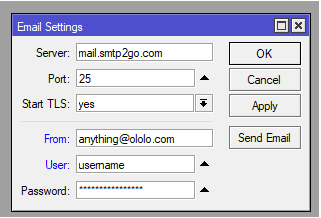
3.配置邮件服务器 工具 -> 电子邮件 配置您的电子邮件服务器参数。
要检查电子邮件设置,请在终端中运行以下命令发送测试消息:
- /tool e-mail send to="这里修改成你的邮箱地址@qq.com" subject="backup & update test!" body="It works!";
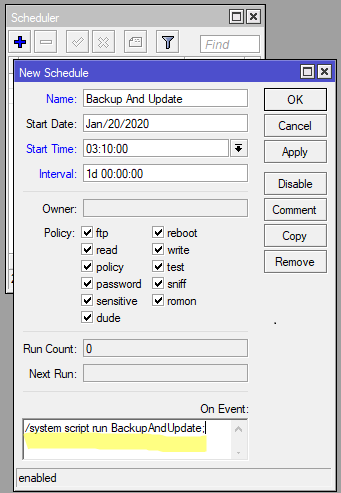
4.创建计划任务 系统 -> 调度程序 [添加] 名称:Backup And Update 开始时间:(03:10:00链中所有 mikrotik 设备的开始时间必须不同) 间隔:1d 00:00:00 事件发生时:/system script run BackupAndUpdate;
或者您可以使用此命令来创建任务:
- /system scheduler add name="Firmware Updater" on-event="/system script run BackupAndUpdate;" start-time=03:10:00 interval=1d comment="" disabled=no
5.测试脚本 一切设置完成后,验证脚本是否正常运行非常重要。为此,请在 WinBox 中打开一个新终端和一个日志窗口,然后通过
- /system script run BackupAndUpdate
在终端中键入内容手动执行脚本。您将在日志窗口中看到脚本的操作。如果脚本完成且没有任何错误,请检查您的电子邮件。您将收到一条新消息,其中包含来自 MikroTik 的备份。 |
 关注公众号
关注公众号

 窥视卡
窥视卡 雷达卡
雷达卡


 发表于 2026-8-20 21:42:39
 提升卡
提升卡 置顶卡
置顶卡 沉默卡
沉默卡 喧嚣卡
喧嚣卡 变色卡
变色卡 千斤顶
千斤顶 照妖镜
照妖镜