查看: 507|回复: 0

[Mikrotik Ros] RouterOS V7.12使用MACVLAN多拨

[复制链接]

124

主题

0

回帖

508

积分

管理员

积分
508
发表于 2026-8-22 13:45:56 | 显示全部楼层 |阅读模式
RouterOS从7.12开始支持Linux虚拟网卡技术Macvlan,可以在单个物理接口上创建多个macvlan虚拟接口,使配置更灵活方便。
以前要实现单口多拨,要求MAC地址不一样的,实现比较麻烦,需要通过briage来实现,现在有了macvlan,多拨会非常方便。

操作方法
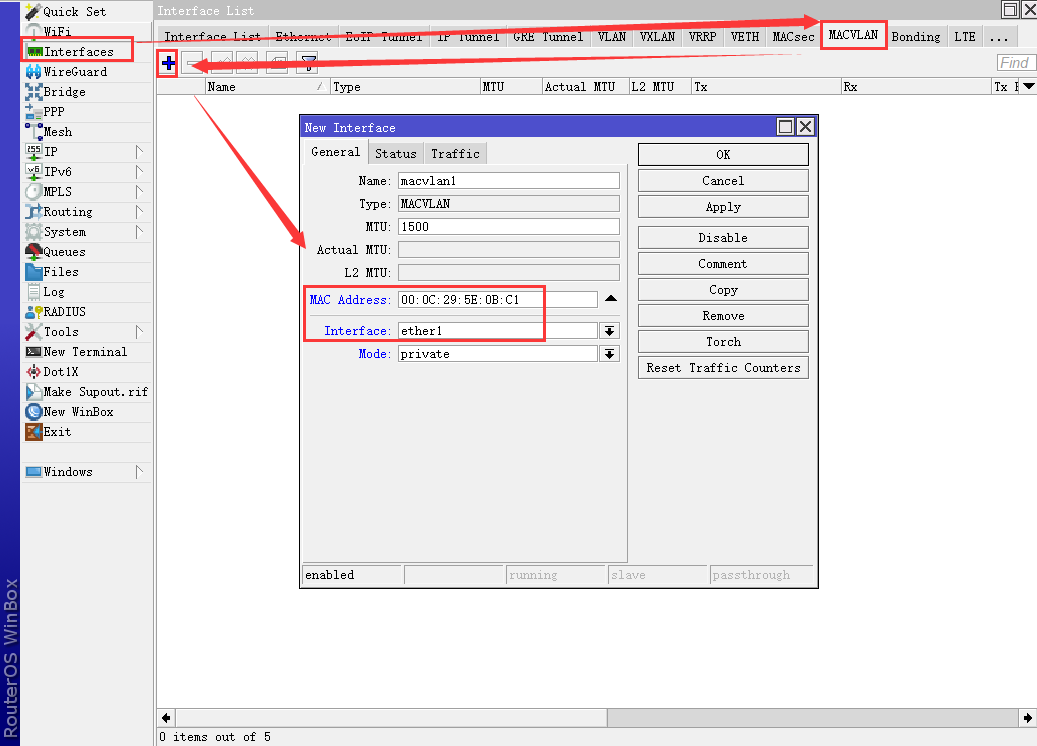
1、使用Winbox,Interface --> MACVLAN --> +,增加一条macvlan记录。
MAC Address:填写你自己的mac地址
Interface:ether1(选择连接到光猫的物理网口)


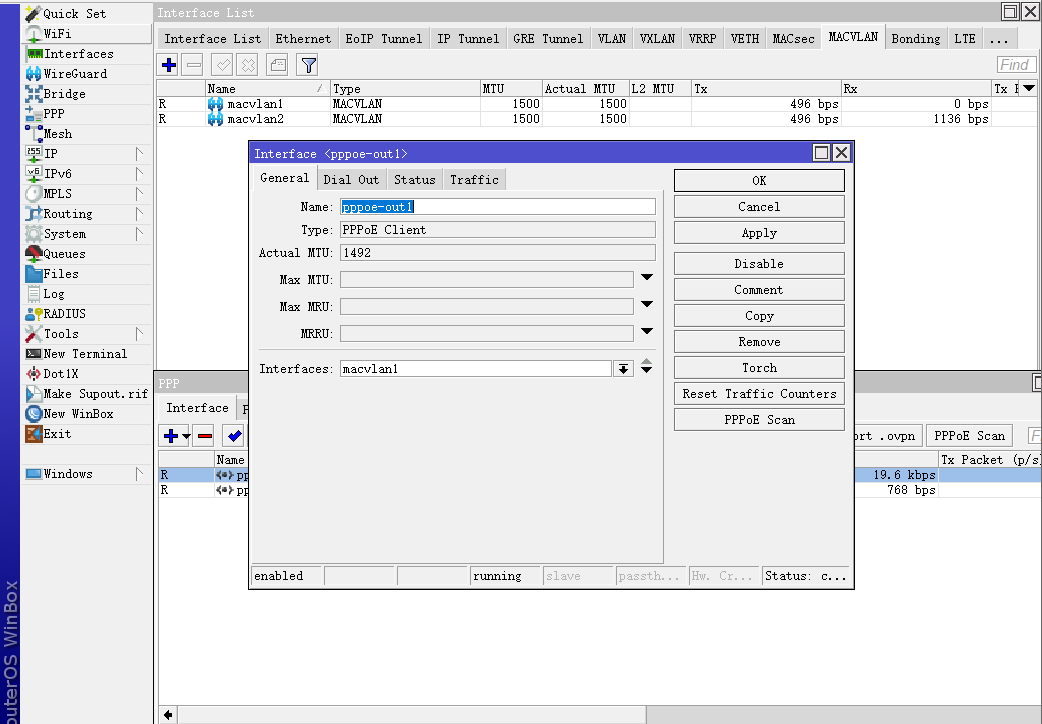
2、pppoe-client创建的时候,Interfaces选择macvlan接口。


3、RouterOS命令

  1. #创建macvlan接口
  2. /interface macvlan add mac-address=00:0C:29:5E:0B:C1 mode=private name=macvlan1 interface=ether1
  3. /interface macvlan add mac-address=00:0C:29:5E:0B:C2 mode=private name=macvlan2 interface=ether1
  4. #创建pppoe-client拨号
  5. /interface pppoe-client add interface=macvlan1 name=pppoe-out1 user=ls605_com password=ls605_com
  6. /interface pppoe-client add interface=macvlan2 name=pppoe-out1 user=ls605_com password=ls605_com
复制代码


本帖子中包含更多资源

您需要 登录 才可以下载或查看,没有账号?立即注册

×
您需要登录后才可以回帖 登录 | 立即注册

本版积分规则

关注公众号

相关侵权、举报、投诉及建议等,请发 E-mail:admin@discuz.vip

Powered by Discuz! X5.0 © 2001-2026 Discuz! Team.|蜀ICP备17024538号-6

在本版发帖
关注公众号
QQ客服返回顶部