|
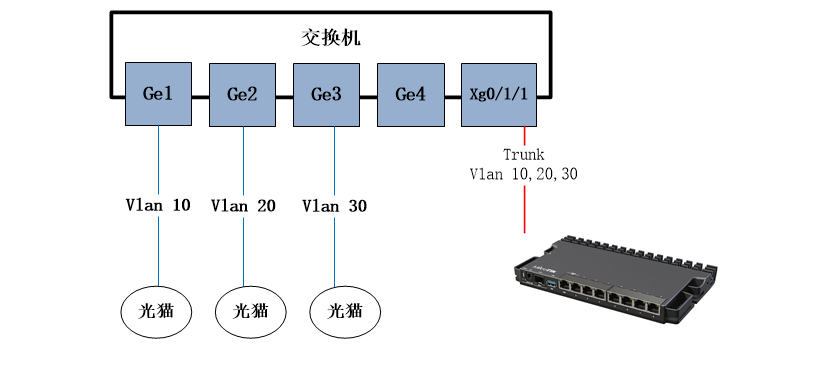
RouterOS v7.12开始支持macvlan,意味着pppoe客户端单接口多拨,不再需要创建vrrp(vrrp无法修改mac地址)或者bridge方式来修改mac地址,可以使用macvlan来创建虚拟mac地址拨号,这样简化了操作配置,同样也减少了路由器开销。 下面的实例基于划分VLAN的方式进行拨号,pppoe接入在交换机上都设置一个单独的VLAN ID,然后通过trunk到RouterOS的sfp-sfpplus1接口,创建VLAN子接口后,进行拨号。 华为交换机配置
创建GigabitEthernet 0/0/1-GigabitEthernet 0/0/3的模式access,vlan id分别是10,20,30 - [Huawei]interface GigabitEthernet 0/0/1
- [Huawei-GigabitEthernet0/0/1]port link-type access
- [Huawei-GigabitEthernet0/0/1]port default vlan 10
- [Huawei-GigabitEthernet0/0/1] interface GigabitEthernet 0/0/2
- [Huawei-GigabitEthernet0/0/2]port link-type access
- [Huawei-GigabitEthernet0/0/2]port default vlan 20
- [Huawei-GigabitEthernet0/0/2] interface GigabitEthernet 0/0/3
- [Huawei-GigabitEthernet0/0/3]port link-type access
- [Huawei-GigabitEthernet0/0/3]port default vlan 30
配置interface XGigabitEthernet0/1/1端口为Trunk口配置,设置vlan 10,20,30 - [Huawei]interface interface XGigabitEthernet0/1/1
- [Huawei-interface XGigabitEthernet0/1/1]port link-type trunk
- [Huawei-interface XGigabitEthernet0/1/1]port trunk allow-pass vlan 10 20 30
配置sfp-sfpplus1接口的vlan子接口 - /interface vlan
- add interface=sfp-sfpplus1 name=vlan10 vlan-id=10
- add interface=sfp-sfpplus1 name=vlan20 vlan-id=20
- add interface=sfp-sfpplus1 name=vlan30 vlan-id=30
基于vlan10,vlan20,vlan30创建对应的macvlan接口,并设置固定mac地址 - /interface macvlan
- add interface=vlan10 mac-address=72:73:50:81:27:10 mode=private name=macvlan10
- add interface=vlan20 mac-address=72:73:50:81:27:20 mode=private name=macvlan20
- add interface=vlan30 mac-address=72:73:50:81:27:30 mode=private name=macvlan30
创建PPPoE拨号接口到对应的macvlan - /interface pppoe-client
- add disabled=no interface=macvlan10 name=pppoe-out1 user=yus
- add disabled=no interface=macvlan20 name=pppoe-out2 user=yus
- add disabled=no interface=macvlan30 name=pppoe-out3 user=yus
剩下的是需要创建3条PCC规则 生成如下: - /routing table
- /routing table add fib name=route1
- /routing table add fib name=route2
- /routing table add fib name=route3
- /ip firewall mangle
- add chain=prerouting connection-mark=no-mark dst-address-type=!local action=mark-connection per-connection-classifier=both-addresses:3/0 src-address=192.168.88.0/24 new-connection-mark=pcc1
- add chain=prerouting action=mark-routing src-address=192.168.88.0/24 connection-mark=pcc1 new-routing-mark=route1
- add chain=prerouting connection-mark=no-mark action=mark-connection in-interface=pppoe-out1 new-connection-mark=pcc1
- add chain=output action=mark-routing connection-mark=pcc1 new-routing-mark=route1
- add chain=prerouting connection-mark=no-mark dst-address-type=!local action=mark-connection per-connection-classifier=both-addresses:3/1 src-address=192.168.88.0/24 new-connection-mark=pcc2
- add chain=prerouting action=mark-routing src-address=192.168.88.0/24 connection-mark=pcc2 new-routing-mark=route2
- add chain=prerouting connection-mark=no-mark action=mark-connection in-interface=pppoe-out2 new-connection-mark=pcc2
- add chain=output action=mark-routing connection-mark=pcc2 new-routing-mark=route2
- add chain=prerouting connection-mark=no-mark dst-address-type=!local action=mark-connection per-connection-classifier=both-addresses:3/2 src-address=192.168.88.0/24 new-connection-mark=pcc3
- add chain=prerouting action=mark-routing src-address=192.168.88.0/24 connection-mark=pcc3 new-routing-mark=route3
- add chain=prerouting connection-mark=no-mark action=mark-connection in-interface=pppoe-out3 new-connection-mark=pcc3
- add chain=output action=mark-routing connection-mark=pcc3 new-routing-mark=route3
- /ip route
- add gateway=pppoe-out1 routing-table=route1
- add gateway=pppoe-out2 routing-table=route2
- add gateway=pppoe-out3 routing-table=route3
- /ip firewall nat
- add chain=srcnat action=masquerade src-address=192.168.88.0/24 out-interface=pppoe-out1
- add chain=srcnat action=masquerade src-address=192.168.88.0/24 out-interface=pppoe-out2
- add chain=srcnat action=masquerade src-address=192.168.88.0/24 out-interface=pppoe-out3
|
 关注公众号
关注公众号

 窥视卡
窥视卡 雷达卡
雷达卡


 发表于 2026-8-28 22:02:27
 提升卡
提升卡 置顶卡
置顶卡 沉默卡
沉默卡 喧嚣卡
喧嚣卡 变色卡
变色卡 千斤顶
千斤顶 照妖镜
照妖镜